


How to Use the EQ Output on the St James Suite
Once you’ve set up your guitar tone, there is just one final step left in getting a studio ready guitar tone… the post processing. This is made up of various things that are typically done after the guitar recording takes place, such as bus compression, EQ, post FX etc.
The St James Suite also contains an EQ module which sits after every other aspect of the signal chain, this is based on a classic rack mount EQ unit that can be found in major studios all over the world.
This allows you to make some final tweaks to your tone to get it studio recording ready.
The EQ Module
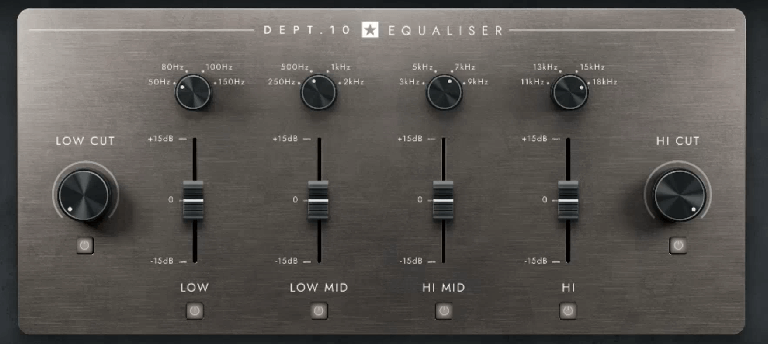
The EQ module itself has a low and high cut along with 4 adjustable frequency bands. Each of the bands has a 4 way selector to select a main frequency to cut or boost. You can also switch each band on or off based on your EQ needs.
Each of the 4 bands can be cut by -15dB or boosted by +15dB.
Low and High Cuts
The Low and High Cuts sit at either end of the EQ module. These determine the start and end points of the frequency spectrum that you hear.
The Low Cut is used to roll off unwanted low end, you can roll off everything up to a maximum of 200Hz.
The High Cut removes high end by rolling back the highs, you can take it from a maximum of 20kHz down to 1kHz.
Although you can do some pretty wide cuts with these bands, you won’t be wanting to set them as extreme as that. For a good starting point, set your Low Cut to 80-100Hz and your High Cut to 12-13kHz. If you need to take off additional lows or highs you can roll them back accordingly.
4 EQ Bands
Inside the EQ module there are 4 EQ bands, these have a large range of cut and boost capabilities but as you hear in the attached video, you won’t want to push these bands to the extreme limits as it can have a negative effect on your tone.
Use these EQ bands to gentle adjust your overall guitar tone to make it exactly how you want it to be.
If you are sitting your guitar tone in a mix, you can gently back off the Lows around 80Hz to make room for the kick drum, or slightly push the 3-5kHz range to give your guitar tone more bite.
This section of the Plugin Suite is a great way to give your guitar that final polish before it hits the mix stage.
————————————————————————-
About the Author
This article on how to use the EQ output on the St James Suite was written by Leigh Fuge. Leigh is a professional guitarist and content creator and also works alongside musicteacher.com to create guitar focused, educational and entertainment content.
If you’re looking for a guitar teacher in your local area, check out their music teacher database to find your local teacher today. Each teacher has their own local page such as Guitar Lessons Wembley. Find your local teacher today!